JET_errMissingLogFile -528 -548 – Exchange 2010 database recovery
I have been dealing with recovering exchange databases for a long time now and recently had someone contact me with a typical no backup server crash scenario.
The purpose of this article is to demonstrate a method by which “possibly” you can eliminate a repair or /p process or a restore of your Exchange database.
Now, there is no guarantee that this would work – take it as a last resort.
I am going to assume you have tried the normal process as outlined in the article:
Exchange Database Recovery – Using eseutil commands: https://msexchangeguru.com/2009/07/12/exchange-database-recovery-using-eseutil-commands/
Here, we have some pre-requisites to go through before we proceed
- You have an Exchange 2010 database in a dirty shutdown state
- You have at least 300 log files in a healthy state
First process is to make a note of which log files does the database require to make itself to a clean shutdown state
To know this, run eseutil /mh which will show you the logs required:
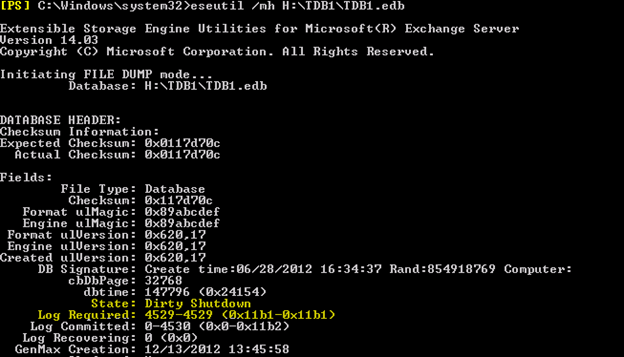
So here we need the logs:
E06000011B1 – Ox means the prefix of the log name
Now, try to find if you have this log file intact.
Mostly it maybe the E00.log file
In my case, I had the E00.log and E00tmp.log
Which means the server crashed when a new E00.log was in the process of being created.
Now try to perform soft recovery and recover the database.
Exchange gives you an option of lossy recovery which lets you ignore missing logs as outlined here:
Exchange 2007: Operation terminated with error -939586631 The restore environment information isn’t found or cannot be opened: https://msexchangeguru.com/2010/07/27/e2k7-restore-939586631/
So try the command:
Eseutil /r E0n /l “Log file location” /d “Database Location” /a /i
- E0n – Name of the log file sequence like E00, E01, E02 etc
- /a – This is the key. This switch will allow a lossy recovery option
- /i – will override database mismatch
If this doesn’t work, simply try the following before you decide to repair the DB.
NOTE: BACKUP ALL YOUR DATABASE and LOGS
Rename the CHECKPoint file which is E06.chk in my case
The checkpoint file remembers the last played log in our case won’t help.
Now create a newfolder – LOGS and copy all 300 logs to that location till the E06000011B1 log file
Now make a copy of “E06000011B1.log” and rename it to E00.log and place in the same location
You can use eseutil /mk “E06000011B1.log” to know the LGen number of the log
Make sure the checkpoint file is renamed.
Now run the soft recovery command again and “DELETE THE NEW E00.LOG” that you created while soft recovery is running
Eseutil /r E06 /l “NEW log file location” /d “DB Location” /a /i
This is tricky process. Read again – while the soft recovery is proceeding, you need to delete the E00.log file and once the recovery completes, the database will be in clean shutdown state.
Before mounting the database again, clear all logs in the database location so that we can start with a new set of log files and BACKUP right away.
Let’s say the database need two log files to make itself clean – E06000011B1 and E06000011B2 and you have E00.log and E00tmp.log in the logs location, simply look for E00.log and E00tmp.log number using the command eseutil /mk and rename E00 to E06000011B1.log and E00tmp.log to E06000011B2.log and make a copy of E06000011B2.log and make it E00.log which we can delete while soft recovery is running.
The reason I mentioned you need atleast 300 logs is because soft recovery is a lighting fast process and it wont let you delete the E00.log if it doesn’t have enough logs to replay to the database.
You can repeat the steps several times but – delete the CHECKPOINT file everytime or it will fail instantly.
You can contact me with questions at the Contact- US section.
Ratish Nair
MVP Exchange
Team @MSExchangeGuru
Keywords: exchange database recoevery, eseutil, Exchange database missing logs, repair exchange database.




February 1st, 2013 at 4:45 pm
[…] JET_errMissingLogFile -528 -548 – Exchange 2010 database recovery: https://msexchangeguru.com/2013/02/01/jet_errmissinglogfile-528-548/ […]
March 21st, 2014 at 12:47 am
Thank you for another informative web site. Where else may just I am getting that type of info written in such a perfect manner? I’ve a undertaking that I am simply now operating on, and I have been at the glance out for such information.
April 1st, 2014 at 7:23 am
Mr Ratish,
Thanks for the very helpful analysis of the recovery problem. The problem i have is I have few log files (22) and the E00.log and when I try to run the:
Eseutil /r E06 /l “NEW log file location” /d “DB Location” /a /i
I only have less than a second and I dont have time to delete the E00.log file during the recovery execution. I always get a
“Operation terminated with error -1018 (JET_errReadVerifyFailure, Checksum error on a database page) after 0.827 seconds.”
The /mh switch tells me that E0000009325.log is required and my logs stop at 9324.log. Is the E00.log file the missing one?
Can u help me?
Thanks in advance
Nikos
April 2nd, 2014 at 3:49 pm
Yes the missing file is E06.log. It might be eaten by your antivirus quarantine.
What is the Exchange version?
April 2nd, 2014 at 3:56 pm
Tough situation my friend. If you have a backup, try to get those logs…
May 14th, 2014 at 2:03 pm
Hello Ratish,
I have restored my database from an offline backup and brought it to consistency.
Now I am trying to replay additional logs created after the backup time into the database:
E:\REC\Mailbox Database 1\> eseutil /r E00 /l”E:\REC\logset1″ /a /i successfully process a whole list of logs for like 30 min, but does not update the database, and its size remains the same as after restoring from backup.
E:\REC\Mailbox Database 1\> eseutil /r E00 /d”E:\REC\Mailbox Database 1″ /l”E:\REC\logset1″ /a /i = fails with “error -551 (JET_errConsistentTimeMismatch, Database last consistent time unmatched)”
Is there any way to workaround the Jet-551 error and replay those logs into the database?
May 14th, 2014 at 2:06 pm
@MX- Are the logs in sequence ?
Say you have logs till e00444.log in your location. If yes, you need to have e00445.log – 30 logs.
In that case, move the checkpoint file to a different location and rename the 30th log file to e00.log and start replying…
e00 and e00444 are just examples…
May 15th, 2014 at 4:58 am
@Ratish – the logs are in sequence, but I guess the beginning and ending of sequence is missed.
Per say, backup is recovered with EDB+ e0x0123.log-e0x0345. /mh states dirty shutdown.
The /r E00 restores the database to clean shutdown.
Then I have a recent consequent log pack of e0x789.log-e0x0abc.log; so literally some logs between e0x0345(backup) and e0x789(last db run) are absent.
1. Eseutil /r E00 /l”bkpLogsPath” – brings the database to clean shutdown
2. Eseutil /r E00 /l”lastLogsPath” /a /i – successfully completed after 6789.123 seconds, database size is not changed for a byte since restore.
2.2 Eseutil /r E00 /d”dbPath” /l”lastLogsPath” /a /i – falls with JET_errConsistentTimeMismatch (despite using /i /a)
Yes, I remove chk, temp and jrs files to have strictly log fies. Initially I rename the last log file to E00.log, and then during /r run I tried A) to rename it back to e0x0abc.log, B) to replace E00.log file with original e0x0abc.log; C) delete E00 at all.
I continue restoring attempts, and would greatly appreciate any advices.
July 29th, 2015 at 6:20 am
Hi Ratish,
thanks for your blogpost – good as usual.
I have currently this problem with one of our exchange DBs, it requires log file 502 to 516, log committed is 517, my newest existing log is 3dc, this is “log recovering” (I have more than 1000 log files available).
Do I have a chance to do your trick with this constellation and if so – how?
(as the required files are missind I do not know which ones I should rename to what)
Best regards
Markus
August 5th, 2015 at 5:59 am
Run eseutil /r and you should be good if you don’t have disk space issue.
January 4th, 2016 at 11:20 am
Hello,
Kindly assist, below is the error message I get when I run the command:
Error: Access to source database ‘db7.edb’ failed with Jet error -1811.
Operation terminated with error -1811 (JET_errFileNotFound, File not found) after 0.16 seconds.
Kindly assist
Abdul-Azeez
January 4th, 2016 at 8:24 pm
It says file not found. which means file is not present at the location. Give the correct path then run the command.